550 5.7.1: message refused, delivery not authorized
The receiving server understood the message and refused it on purpose. 5.7.1 covers many policies, so the text after the code matters more than the code itself.
Updated 3 min read
On this page (7)
550 5.7.1 is a permanent SMTP reply: refused for a policy reason. This page is part of our SMTP error code reference, where every code links to the RFC and to what Gmail, Outlook and Yahoo publish about it.
- Kind
- Permanent: sending the same message again fails the same way
- Retry by hand
- No, fix the cause first
- In Sukhovei Mail
bounced, address not suppressed
What 550 5.7.1 means
550 is the generic permanent refusal, including "command rejected for policy reasons" [1]. X.7.1 is "Delivery not authorized, message refused": "The sender is not authorized to send to the destination. This can be the result of per-host or per-recipient filtering" [2].
Because the code is shared by spam filters, relay rules, sender rules and administrator policies, read the text that follows it. That text names the actual reason.
What Gmail, Outlook and Yahoo say
- Gmail
- Uses 550 5.7.1 for over twenty different refusals. Examples: "This message is likely unsolicited email", "The IP you're using to send email is not authorized to send email directly to our servers", "Messages missing a valid Message-ID: header are not accepted" and "This email has been rate limited" [3].
- Outlook and Microsoft 365
- Lists 5.7.1 as "Delivery not authorized": "The sender of the message isn't allowed to send messages to the recipient" [4].
Yahoo does not list 550 5.7.1 on the error pages we read, so we do not guess what it means by it.
Sources, read on October 14, 2026
- [1]RFC 5321, Simple Mail Transfer Protocol, section 4.2: www.rfc-editor.org/rfc/rfc5321#section-4.2
- [2]RFC 3463, Enhanced Mail System Status Codes: www.rfc-editor.org/rfc/rfc3463
- [3]Google, Gmail SMTP errors and codes: knowledge.workspace.google.com/admin/support/troubleshooting/gmail-smtp-errors-and-codes
- [4]Microsoft Learn, Email non-delivery reports and SMTP errors in Exchange Online: learn.microsoft.com/en-us/troubleshoot/exchange/email-delivery/ndr/non-delivery-reports-in-exchange-online
Prices change. If something here is out of date or wrong, email hello@mailbay.dev and we will fix it.
Common causes
- The receiving organisation restricts who may send to that address, such as an internal only distribution list.
- Content or reputation filters judged the message to be spam.
- The message breaks a format rule, such as a missing Message-ID or several From headers.
- You tried to relay: sending through a server that does not accept mail from you for that destination.
How to fix it
- Read the full reply text and the enhanced code together, and look the text up on the receiver's own error page.
- If it is an address restriction, ask the recipient's administrator to allow your sender or domain.
- If it is a reputation or spam refusal, check SPF, DKIM and DMARC first (see 550 5.7.26); send a test email to the deliverability test to see which check fails. Then look at the content and the list the address came from.
- If it is a format rule, fix the headers your code writes. Sukhovei Mail sets From, Message-ID and the threading headers itself.
How Sukhovei Mail reports it
When a recipient's server answers 550 5.7.1 to mail you send through Sukhovei Mail, the recipient becomes bounced and you get a message.bounced event with the server's reply in response and permanent: false. The message statuses page lists every state.
A policy refusal says nothing about whether the address exists, so Sukhovei Mail does not suppress it, and it does not count toward the automatic pause, which only counts hard bounces and spam complaints.
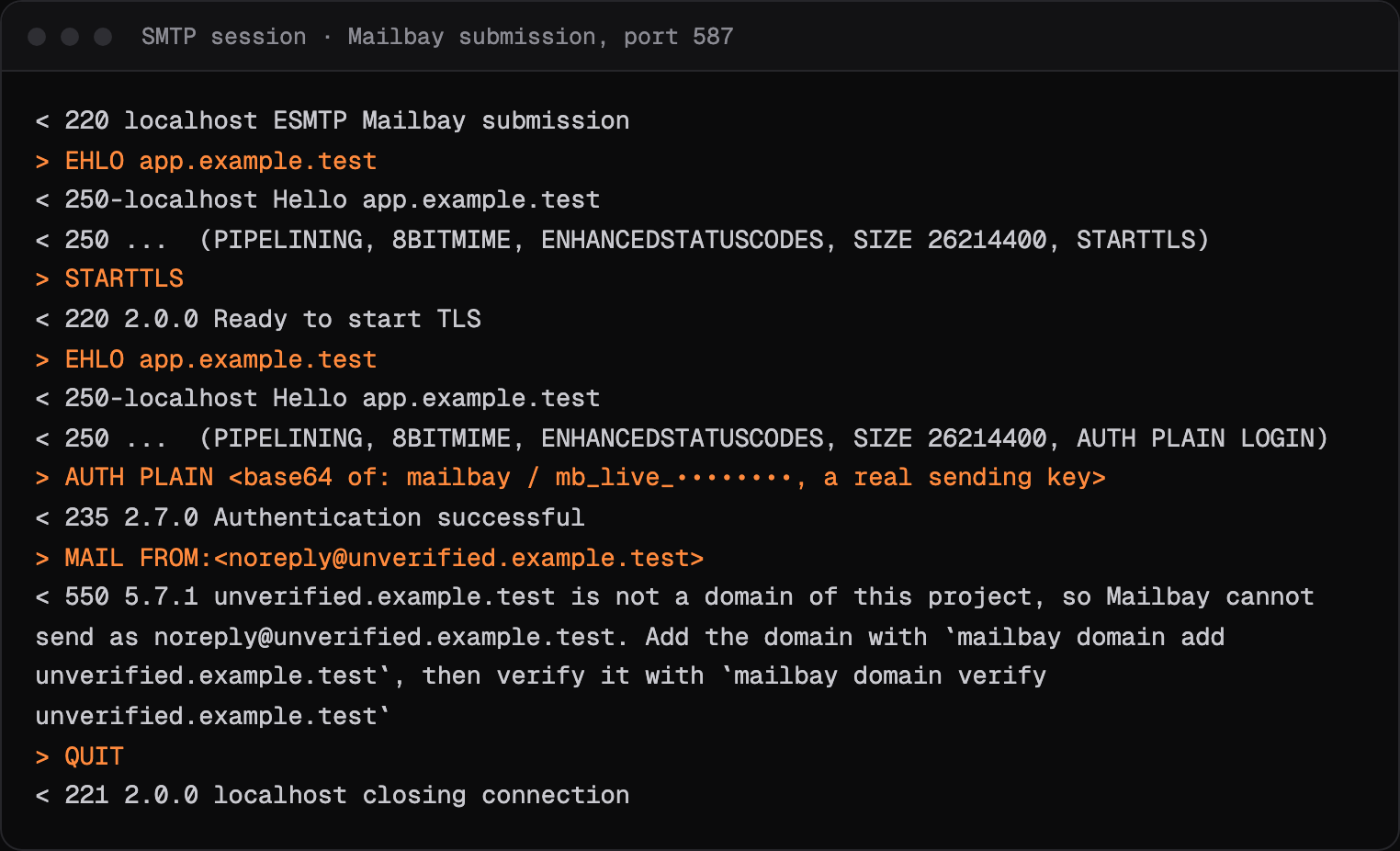
Sukhovei Mail's own submission server answers 550 5.7.1 when it will not send for you, always with the reason and a fix: a MAIL FROM on a domain that is not verified in the project, an app password used for another inbox's address, a role without reply access, or a recipient on the project's suppression list. Sukhovei Mail's receiving server answers 550 5.7.1 Message rejected as spam when its spam check rejects incoming mail.
Related codes
- 554 5.7.1: transaction refused, permanent.
- 550 5.7.26: failed SPF, DKIM or DMARC, permanent.
- 550 5.1.1: mailbox does not exist, permanent.
- 535 5.7.8: login rejected, permanent.
- 530 5.7.0: sign in first, permanent.
- 550 5.7.515: sender rules at Outlook.com, permanent.
Seeing an API error rather than an SMTP code? Sukhovei Mail's own errors, each with a fix, are on the errors page.
Questions
Is 550 5.7.1 a hard bounce?
It is a permanent refusal, but not a statement that the address is bad. Sukhovei Mail records it as bounced and does not suppress the address, because the same address may accept a different message or sender.
What does 550 5.7.1 relaying denied mean?
You handed the message to a server that will not pass it on for you, usually because you did not authenticate or used the wrong server. Send through your provider's submission server with your credentials.
Why does Gmail use 550 5.7.1 for so many errors?
Google's page lists over twenty refusals under 550 5.7.1, from spam verdicts to header format rules. The sentence after the code identifies which one you hit.
Read next
- 554 5.7.1: message refusedThe server refused the transaction for a policy reason. Like 550 5.7.1, the text after the code is what tells you why.
- 550 5.7.26: the email is unauthenticatedThe message failed the receiver's authentication checks, so it was refused. The fix is in your DNS: SPF, DKIM and a DMARC record that line up with your From domain.
- SMTP error codesWhat a bounce or deferral code means, what Gmail, Outlook and Yahoo say about it in their own words, and how to fix it. Each page shows a real SMTP session.
Put Sukhovei Mail to work
Get inboxes, sending, your own domains and MCP in one workspace. The free plan includes 3 inboxes, 3,000 emails a month and 3 custom domains, with no card.