Email in Python with requests
No SDK needed: Sukhovei Mail's REST API works with plain requests. This script receives and sends, and handles errors with the fix Sukhovei Mail returns.
pip install requests
export MAILBAY_API_KEY=mb_live_xxxxxxxxx
python mailbay_demo.py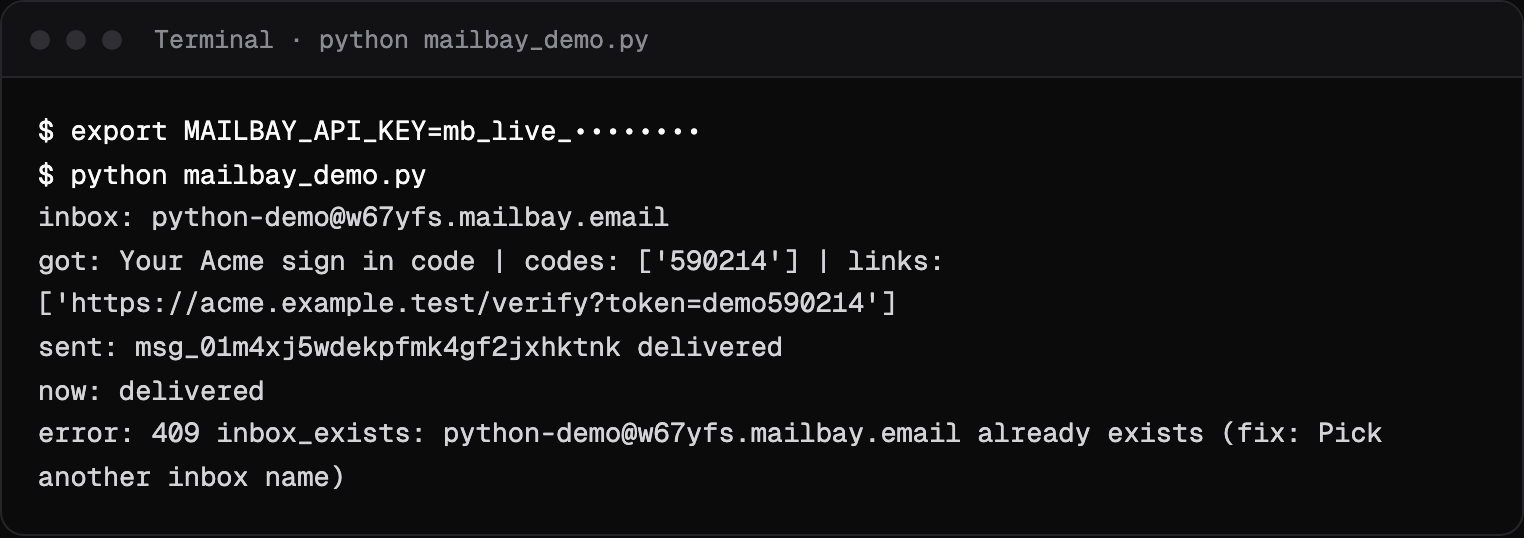
Set up in one paste
You need Python 3, the requests package and an API key from the dashboard. Nothing else: Sukhovei Mail has no Python SDK, and does not need one for this. If you have never made a key or an inbox, the quickstart walks through it in a minute.
python3 -m venv .venv && . .venv/bin/activate
pip install requests
export MAILBAY_API_KEY=mb_live_xxxxxxxxx
The script
Four steps: create an inbox, wait for an email and its code, send a message and read its status, then show what an error looks like. The call helper turns every Sukhovei Mail error into an exception that carries the fix, listed on the errors page.
import os
import requests

API = os.environ.get("MAILBAY_API_URL", "https://api.mailbay.dev/v1")
session = requests.Session()
session.headers["Authorization"] = f"Bearer {os.environ['MAILBAY_API_KEY']}"


def call(method, path, **kwargs):
    r = session.request(method, f"{API}{path}", timeout=90, **kwargs)
    if not r.ok:
        err = r.json()["error"]
        raise RuntimeError(f"{r.status_code} {err['code']}: {err['message']} (fix: {err['fix']})")
    return r.json() if r.content else None


# 1. Create an inbox
inbox = call("POST", "/inboxes", json={"local_part": "python-demo"})
print("inbox:", inbox["address"])

# 2. Block until a matching email arrives (up to 60 seconds)
found = call("GET", f"/inboxes/{inbox['id']}/wait", params={"subject": "code", "timeout": 60})
print("got:", found["message"]["subject"], "| codes:", found["codes"], "| links:", found["links"])

# 3. Send, then read the status back
sent = call("POST", f"/inboxes/{inbox['id']}/messages",
            json={"to": "delivered@test.mailbay.dev", "subject": "Hello from Python", "text": "It works."})
print("sent:", sent["id"], sent["status"])
print("now:", call("GET", f"/messages/{sent['id']}")["status"])

# 4. Errors carry a code and a fix
try:
    call("POST", "/inboxes", json={"local_part": "python-demo"})
except RuntimeError as e:
    print("error:", e)
GET /inboxes/{id}/waitStep 2 is a long poll
One request that returns as soon as a message with “code” in the subject arrives, with the one time codes and links already extracted. Details under wait for an email.delivered@test.mailbay.devStep 3 sends to a test address
It simulates delivery, so you can run the script before you verify a domain.bounced@andcomplained@work too. Before sending to real people from your own domain, send one message to the email deliverability test to check its authentication.
Run it
We ran the script against a local Sukhovei Mail stack. While it waited, a test service emailed a code to the new inbox; the wait returned it a few seconds later. The output is at the top of this page.
Retries without sending twice
A send that times out may still have gone through. Send an Idempotency-Key header, the same one on every retry of the same email, and Sukhovei Mail returns the first result instead of sending again. Keys are kept for 24 hours. We ran this twice in a row and got the same message id both times, with one email sent:
import os, uuid
import requests

API = os.environ.get("MAILBAY_API_URL", "https://api.mailbay.dev/v1")
headers = {"Authorization": f"Bearer {os.environ['MAILBAY_API_KEY']}"}
inbox_id = os.environ["INBOX_ID"]

key = str(uuid.uuid4())  # one key per logical email, reused on every retry
body = {"to": "delivered@test.mailbay.dev", "subject": "Receipt #1043", "text": "Thanks"}
for attempt in range(2):
    r = requests.post(f"{API}/inboxes/{inbox_id}/messages", json=body,
                      headers={**headers, "Idempotency-Key": key}, timeout=30)
    print(attempt, r.status_code, r.json()["id"])
0 201 msg_01m4xkepa4err47exeez7v1hrx
1 201 msg_01m4xkepa4err47exeez7v1hrxInstead of waiting: webhooks
Waiting suits scripts, tests and agents. A web app should be told instead: register a webhook for message.received and the delivery events, and verify each request's signature with the Python function on the webhooks page. When a send bounces, the event carries the receiving server's reply, such as 550 5.1.1; the SMTP error code reference explains what each one means.
Coming from Resend's Python SDK? The Resend alternative page covers the migration. Testing a web app's emails? See the Playwright integration, and all integrations on the integrations page. Using Django or FastAPI? Their snippets are in the directory too.
Questions
Is there a Sukhovei Mail Python SDK?
Not today. The REST API is small enough to call with requests, as on this page, and every error comes back as JSON with a code, a message and a fix.
Can I send with smtplib instead?
Yes. Use smtp.mailbay.dev on port 587 with STARTTLS or 465 with TLS, the username mailbay and an API key that can send as the password. The sender must be on a domain verified in the project.
Why does my send fail with sandbox_recipient_not_allowed?
Until the workspace has a verified domain, inboxes send only to its members, its own addresses and the test addresses. Verify a domain to send to anyone.
How do I receive email in Python without waiting?
Register a webhook for message.received and handle it in Flask, FastAPI or Django. Sukhovei Mail signs each delivery, and the webhooks docs have a Python function that checks the signature.
Related integrations

Read next
Put Sukhovei Mail to work
Get inboxes, sending, your own domains and MCP in one workspace. The free plan includes 3 inboxes, 3,000 emails a month and 3 custom domains, with no card.